
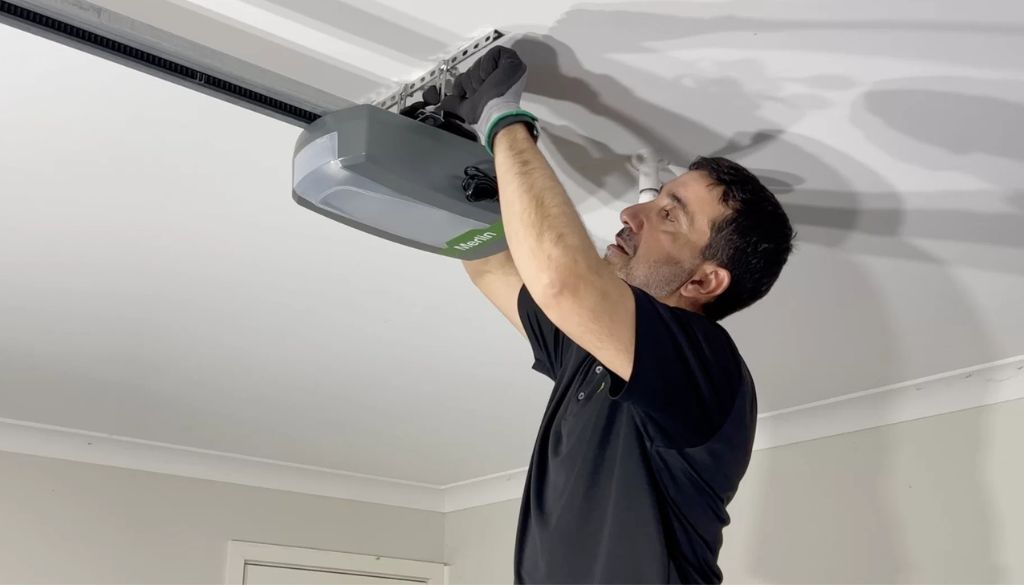
Your Merlin garage door opener is one of the hardest-working pieces of hardware on your property. It handles hundreds of open-and-close cycles every year, and like any well-used piece of equipment, it occasionally needs a reset to get back on track. Whether your remote has stopped responding, your door reverses unexpectedly, or you have just moved into a new home on the Gold Coast and want to start fresh, knowing how to reset your Merlin garage door opener can save you time, money, and frustration.
At A1 Garage Doors Gold Coast, we help Gold Coast homeowners troubleshoot and repair their garage door systems every day. This guide walks you through every type of Merlin reset — from a quick remote reprogram to a full factory wipe — so you can get your door working reliably again. And if the problem turns out to be more than a simple reset, our team is just one call away.
Why Would You Need to Reset Your Merlin Garage Door Opener?
Before diving into the how, it helps to understand the why. Merlin openers are well-built Australian products, but a reset becomes necessary in several common situations:
* You have moved into a new home and want to clear previous owners’ remotes from the system memory.
* Your remote has become unresponsive or works only intermittently.
* The garage door reverses before it fully opens or closes, suggesting sensitivity settings are off.
* You have replaced the motor unit, remote, or opener batteries and need to reprogram the system.
* A power surge or outage has disrupted the opener’s memory.
* You want to revoke access for a lost or stolen remote.
A proper reset addresses the electronics and memory of your opener — but it won’t fix physical faults. If your door is making unusual noises, binding on its tracks, or showing visible wear, check our garage door troubleshooting guide before you reset anything. Identifying the root cause first will save you repeating the process.
Before You Start: Safety and Preparation
* Ensure the garage door is fully closed before beginning any reset procedure.
* Clear the area under and around the door of children, pets, and vehicles.
* Have a step ladder on hand to safely reach the motor unit on the ceiling.
* Keep your Merlin owner’s manual nearby — button placement varies slightly between models.
* Check that the door moves freely by hand (disconnect the opener by pulling the manual release cord) so you know the door itself is not the source of the problem.
If you discover the door binds, sticks, or shows physical damage during this check, a reset will not fix the underlying mechanical issue. Contact our team directly — we carry out same-day garage door repairs across the Gold Coast.
Step 1: How to Reset Your Merlin Garage Door Remote
Check the Battery First
A weak battery is the most common cause of intermittent remote operation. Replace the battery with a fresh CR2032 (or the size specified in your model’s documentation) and test before proceeding to any programming steps.
Option A — Full Memory Wipe (Clears All Remotes)
Use this method when moving into a new home or if you need to revoke access for multiple remotes at once:
1. Locate the yellow Learn button on the back or side of the motor unit.
2. Press and hold until the indicator LED flashes and then goes out — this erases all programmed remotes from the system’s memory.
3. Release the button. The memory is now clear.
4. Press and release the Learn button once to enter programming mode — the LED will light up.
5. Press the button on the remote you want to pair. Hold it until the motor unit’s light flashes or you hear a click to confirm pairing.
6. Test the remote. Repeat for each additional remote you want to add.
This is also an important step to carry out any time you install a new door. If you have recently had a garage door opener installation on the Gold Coast, starting with a clean remote memory ensures only your authorised remotes are paired to the new unit.
Option B — Model-Specific Remote Programming
* Merlin M802: Copy the 12-pin combination from the old remote using the DIP switches, then press the Learn button once and activate the new remote.
* Merlin MT230: Press and hold the red Learn/Delete button on the motor unit, then press the button on your remote. Release both when the LED lights up.
* Merlin E945M: Hold any button on the new remote, press Learn on the motor board, and release when the LED illuminates.
* Merlin M844: Similar to the E945M process; the yellow LED confirms successful pairing.
* Merlin 2.0 Series: Press the yellow programming button on the motor unit, then press your remote button. The LED will flash to confirm.
After programming, always test both the door open and door light functions to confirm the remote is fully paired.
Step 2: How to Reset the Sensitivity (Force Settings)
If your Merlin opener reverses the door before it fully opens or closes, the force (sensitivity) settings need calibration. This is a common issue after a spring replacement, door adjustment, or opener service.
Sectional and Tilt Doors (e.g., Merlin MS105MYQ)
1. Ensure the door is fully closed and the opener is re-engaged (push the manual release back until it clicks into the carriage).
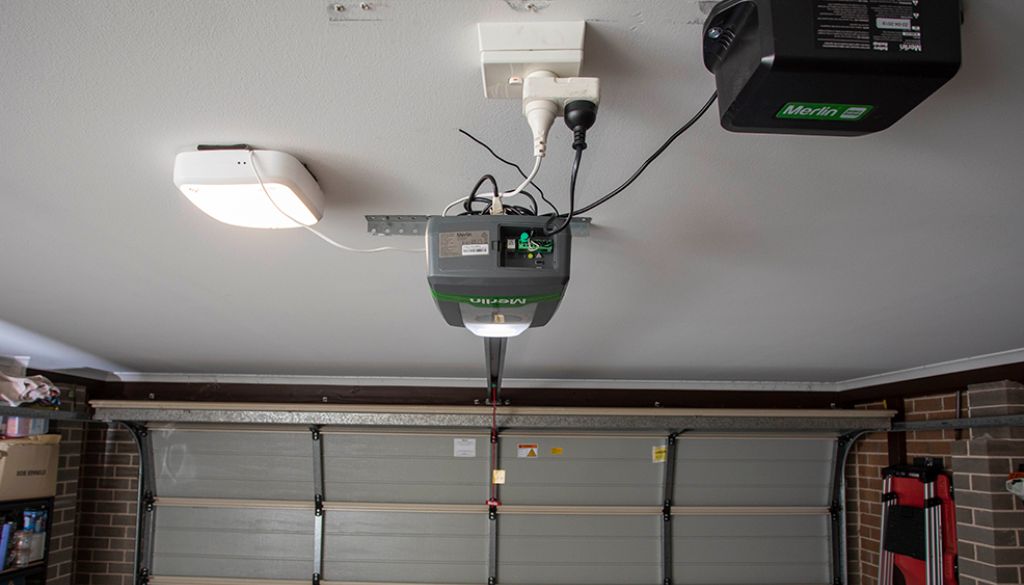
2. Remove the rear panel of the motor housing to access the internal controls.
3. Press the yellow Learn button twice to enter force adjustment mode — the LED will flash.
4. Use your remote or the UP/DOWN buttons to cycle the door through a complete open-and-close.
5. Press the DOWN button once when the door is fully closed to set the closing force. The LED will stop flashing to confirm.
6. Complete one full cycle to finalise the settings.
Roller Doors (e.g., Merlin MR655MYQ)
1. Re-engage the opener with the door in the closed position.
2. Open the small access panel at the base of the motor unit and locate the yellow “S” button.
3.* Press the S button twice to enter force learn mode — the courtesy light will dim and the LED will flash.
4. Press UP to open the door; LED 1 will flash throughout the travel.
5. Press DOWN to close the door fully; LED 1 stops and the courtesy light returns to full brightness.
The opener will complete the calibration cycle automatically.
A properly calibrated door should complete its full travel without reversing and stop cleanly at both endpoints. If sensitivity issues persist after calibration, worn springs or an unbalanced door are likely culprits. This is especially relevant if you have recently upgraded to a composite garage door, as the different weight profile can affect how your opener reads resistance — recalibrating sensitivity after any door change is always recommended.
Step 3: Full Factory Reset — When You Need to Start From Scratch
1. Disconnect the power to the opener at the wall or circuit breaker and wait 30 seconds.
2. Press and hold the Learn button while reconnecting the power.
3.* Continue holding until the LED flashes — confirming all programmed remotes, keypads, and settings have been erased.
4. Release the button. The opener is now in factory default state.
5. Reprogram your remotes following the steps in Step 1 above.
6. Recalibrate the sensitivity settings following the steps in Step 2 if needed.
7. A full reset will also clear any programmed keypads or smart home integrations, so have those details on hand before proceeding.
Merlin 2.0 and Smart Garage: What Changes?
A factory reset on Merlin 2.0 and MyQ-enabled models also disconnects them from the MyQ app. After resetting, re-add the opener to the MyQ app by selecting “Add a Device” and following the in-app instructions to reconnect it to your home Wi-Fi network.
Not sure which Merlin model suits your home? Our garage door opener comparison guide breaks down the full current range — from entry-level belt drives to smart Wi-Fi models — so you can make an informed decision before purchasing or upgrading.
When a Reset Is Not Enough: Signs You Need a Professional
Call A1 Garage Doors Gold Coast on (07) 5515 0277 if you experience any of the following after completing a full reset:
* The door still reverses or stops mid-travel — often indicates a broken spring, worn cable, or unbalanced door.
* The motor unit hums or clicks but the door does not move — the drive system may be worn or jammed.
* The remote cannot pair no matter what steps you follow — the receiver board inside the motor unit may be faulty.
* The door makes grinding, squealing, or banging noises — hardware components need inspection or replacement.
* The opener is more than 10 years old and experiencing repeated issues — it may be time for a replacement.
If your door has stopped working entirely and you cannot get in or out, don’t wait. Head to our emergency garage door repair guide for immediate steps to take while you wait for a technician. Our team carries Merlin-compatible parts and can diagnose and repair most opener faults on the same visit across all Gold Coast suburbs.
Pro Tips for a Smooth Reset Every Time
* Label your remotes after programming to avoid confusion in multi-remote households.
* Test in daylight the first time — good lighting makes it easier to spot the LED indicators on the motor unit.
* Keep a spare battery in the motor unit’s storage compartment so you are never caught out.
* Schedule an annual service check to keep springs, cables, and opener electronics in peak condition.
* Never force a door that is binding — always investigate mechanical issues before resetting.
Frequently Asked Questions
Can I reset my Merlin remote without access to the motor unit?
No. The Learn button on the motor unit is required to erase and reprogram remotes. There is no way to complete the process from the remote alone.
How often should I reset the sensitivity settings?
Only when the door is struggling to travel fully in either direction, after a motor or spring replacement, or following a new installation.
My door still does not work correctly after a full reset — what now?
The issue is almost certainly mechanical: worn springs, damaged cables, misaligned tracks, or a faulty motor. Contact A1 Garage Doors Gold Coast on (07) 5515 0277 for a professional diagnosis.
Will a factory reset delete my MyQ app connection?
Yes. You will need to re-add the device through the MyQ app after completing the reset.
Is it safe to reset my opener myself?
The remote programming and factory reset steps in this guide are safe for homeowners to carry out. If you are unsure about any step, call a licensed technician.
Final Thoughts
Knowing how to reset your Merlin garage door opener puts you in control of one of the most-used entry points in your home. Most reset procedures take less than ten minutes and require no special tools. That said, if a reset reveals a deeper mechanical or electrical issue, there is no substitute for professional help. A1 Garage Doors Gold Coast has been serving the Gold Coast community since 2020, and our team brings genuine expertise to every job — whether it is a quick remote reprogram or a full opener replacement.
Call A1 Garage Doors Gold Coast on (07) 5515 0277 or visit goldcoastgaragedoorrepair.com.au. Located at 1 Waterford Ct, Bundall QLD 4217. Rated 4.9/5 — trusted by Gold Coast homeowners.
